Active equipment in a fiber optic network
Introduction
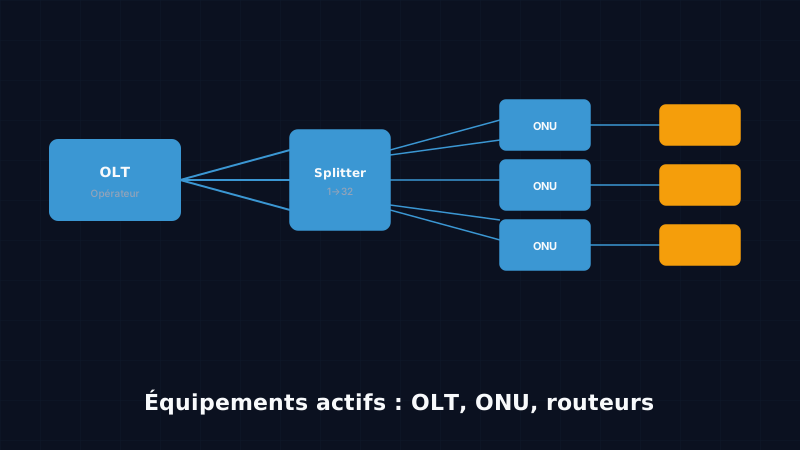
When we talk about fiber optics, we often think of the cable itself — that strand of glass carrying light through streets, buildings, and basements. But fiber alone is not enough. For you to watch a video on YouTube or make a call from home, you need equipment that converts this light into data usable by your devices, routes that data to the right recipient, and manages thousands of simultaneous connections.
This equipment falls into two broad families: passive equipment (the cable, connectors, and junction boxes) and active equipment (everything that needs to be plugged into an electrical power source to function). In this course we will focus on active equipment, since these are the devices you will encounter during commissioning work and subscriber visits.
By the end of this course, you will be able to:
- Distinguish active equipment from passive equipment
- Identify an OLT, its role, and its location in the network
- Understand what an optical splitter does (a key passive component)
- Recognise an ONT/ONU and read its indicator lights
- Know what a gateway box does and how to configure it during commissioning
- Understand the GPON protocol that drives the entire FTTH network
1. Active equipment vs passive equipment
Understanding the fundamental distinction
Before going into detail on individual devices, it is essential to master this distinction — one you will hear constantly on the job site and in training.
A passive component is one that requires no electrical power to function. It does its job purely through the physical properties of its materials. In a fiber network, passive equipment includes: the cables themselves, optical connectors (SC/APC, LC), splice protection sleeves, junction boxes (PBO, PBD), optical patch panels, and most importantly splitters (optical couplers).
An active component is one that needs electricity to function. It processes the signal, amplifies it, converts it, or makes decisions about how data is routed. In a FTTH network, active equipment includes: the OLT at the operator, the ONT or ONU at the subscriber, and the gateway box or router that distributes Wi-Fi throughout the home.
Why this distinction matters on the job site
This is not a purely academic distinction — it has direct practical consequences:
When troubleshooting, if a subscriber has lost their connection, the first question to ask is: is the fault in an active component or a passive component? If the ONT is off or won’t start, the fault is active (power supply, hardware failure). If the optical signal is absent even though the ONT is powered on, a fiber break or a misaligned connector on the passive side is suspected.
From a safety standpoint, an active component can inject laser signal into the fiber. Before touching a connector on the fiber side, always verify that the OLT is configured to send no signal on that port, or use dust caps. We will return to this point in the safety course.
In terms of cost, passive equipment is generally less expensive, requires little or no maintenance, and has a much longer service life (20 to 40 years for a cable in good condition). Active equipment has a service life of 5 to 10 years and requires a permanent power supply, regular maintenance, and periodic replacement.
2. The OLT (Optical Line Terminal)
What it is and where to find it
The OLT, standing for Optical Line Terminal, is the brain of the FTTH network on the operator side. It manages all subscriber connections, distributes bandwidth, and bridges the global Internet to subscribers’ homes.
The OLT is located in the NRO — the Nœud de Raccordement Optique (Optical Distribution Node). In Côte d’Ivoire, Orange NROs are found, for example, in technical premises in city centres or in racks installed in leased facilities. In France or Europe, NROs are often housed in street cabinets, but in Africa the topology varies by city.
Concretely, an NRO looks like a compact server room: metal racks containing electronic equipment, a secured power supply (sometimes a backup generator), and dozens or even hundreds of fiber cables running out in every direction.
What an OLT looks like
An OLT resembles a rack-server appliance. It mounts in a standard 19-inch rack and typically occupies between 2 and 7U (rack units). On the front, line cards carry SFP (Small Form-factor Pluggable) or SFP+ ports into which laser-receiver modules are inserted to connect the fibers.
Each SFP port on an OLT line card can serve an entire PON tree — that is, up to 32, 64, or even 128 subscribers, depending on the split ratio chosen by the operator and the technology in use (GPON, XGS-PON).
Common brands
On the African and global market, the main OLT manufacturers are:
- Nokia (formerly Alcatel-Lucent) — high-end equipment widely deployed in Europe and French-speaking Africa, notably the Nokia 7360 ISAM FX.
- Huawei — very prevalent in sub-Saharan Africa, notably the SmartAX MA5800, known for its reliability and wide range of available line cards.
- ZTE — a direct competitor to Huawei, present with many African operators at slightly lower price points. ZXA10 C600/C650 series.
- Calix — more prevalent in the North American market, particularly among regional operators.
- Fiberhome — a growing Chinese manufacturer, present in West Africa.
Typical OLT capacity
A modern OLT can manage thousands of subscribers in a single rack. For example, the Huawei MA5800-X17 can hold up to 16 line cards, each card managing 8 GPON ports, and each GPON port serving up to 128 subscribers. This gives 16 × 8 × 128 = 16,384 subscribers per OLT. In practice, operators cap the split ratio at 1:32 or 1:64 to maintain acceptable quality of service.
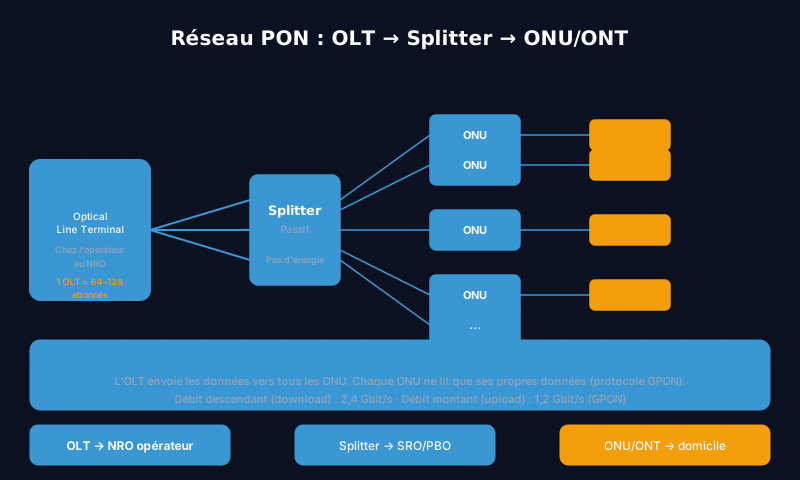 Figure 1 — Simplified architecture of a GPON network: the OLT at the NRO feeds multiple splitters, each serving several ONTs at subscriber premises.
3. The optical splitter (passive equipment)
Why the splitter is at the heart of every FTTH network
Although this course focuses on active equipment, it is impossible to understand FTTH architecture without discussing the splitter. It is the most important passive component in the network, and you will install dozens of them over your career.
The optical splitter (also called an optical coupler or signal divider) is a small enclosure — sometimes no larger than an eraser — that takes one optical signal as input and divides it into several identical signals at its outputs, with no electrical power whatsoever. It works through the physical properties of glass and the technique of guided-mode coupling.
Split ratios
A splitter is characterised by its input/output ratio:
| Ratio | Meaning | Typical use |
|---|---|---|
| 1:2 | 1 fiber in, 2 fibers out | Fine secondary distribution |
| 1:4 | 1 fiber in, 4 fibers out | PBO for a small building |
| 1:8 | 1 fiber in, 8 fibers out | Residential PBO |
| 1:16 | 1 fiber in, 16 fibers out | SRO or dense PBO |
| 1:32 | 1 fiber in, 32 fibers out | Standard SRO |
| 1:64 | 1 fiber in, 64 fibers out | High-capacity SRO |
Insertion loss: a fundamental concept
Every time the signal is divided, it loses intensity. This loss follows a logarithmic law: each doubling of the number of outputs costs approximately 3.5 dB. Typical insertion losses are:
| Ratio | Typical insertion loss |
|---|---|
| 1:2 | ~3.5 dB |
| 1:4 | ~7.0 dB |
| 1:8 | ~10.5 dB |
| 1:16 | ~13.5 dB |
| 1:32 | ~17.0 dB |
| 1:64 | ~20.5 dB |
This is why splitters cannot be cascaded indefinitely in a network: if you add up the losses from cable, connectors, and splitters, you eventually fall below the ONT sensitivity threshold (typically −28 to −30 dBm for GPON), making the connection impossible.
Where splitters are located
In a classic FTTH architecture, splitters are placed at the network aggregation points:
- At the SRO (Sous-Répartiteur Optique — Optical Sub-distribution Point): 1:32 or 1:16 splitters aggregating signals from several streets or neighbourhoods
- At the PBO (Point de Branchement Optique — Optical Branching Point): 1:8 or 1:4 splitters serving a building or group of individual homes
4. The ONT/ONU (Optical Network Unit / Terminal)
The box at the subscriber’s premises
If the OLT is the brain on the operator side, the ONT (Optical Network Terminal) or ONU (Optical Network Unit) is its counterpart on the subscriber side. These two terms refer to essentially the same device — the ITU uses ONT for equipment installed at a single residential subscriber and ONU for equipment serving multiple subscribers (e.g. FTTB in an apartment building). In everyday usage, technicians often use both terms interchangeably.
The ONT acts as a converter: it receives an optical (light) signal from the fiber, transforms it into a digital electrical signal, and passes it to the gateway box or router via an RJ45 Ethernet cable.
Common models
Here are the ONTs you will encounter most frequently in the field in West Africa:
ZTE F601 / F660 / F680 — very widespread at Orange CI and MTN. The F601 is an entry-level model with 1 Ethernet port, very compact. The F660 and F680 offer 4 Ethernet ports + telephony ports + integrated Wi-Fi (combo versions).
Huawei HG8245 / HG8310 / HG8546M — found at many operators. The HG8245 is a very common residential model with 4 Ethernet ports, 2 telephony ports, and 802.11n Wi-Fi. The HG8546M is a newer version with 802.11ac Wi-Fi.
Nokia G-140W-H — high-end, found in recent deployments by premium operators. Offers Wi-Fi 6 (802.11ax), 2.5 Gbit/s Ethernet, and advanced management.
Reading status indicator lights: an essential skill
In the field, you will diagnose the vast majority of subscriber faults by reading the ONT’s indicator lights. Here are the most important ones:
| Indicator | Colour/State | Meaning |
|---|---|---|
| PWR / POWER | Solid green | The ONT is powered |
| PON / OPTICAL | Solid green | Fiber is connected and optical signal is received |
| PON / OPTICAL | Solid red | No optical signal (LOS — Loss of Signal) |
| LOS | Red on | Loss of optical signal — check the fiber connector |
| INTERNET / WAN | Solid green | Active Internet connection |
| INTERNET / WAN | Flashing orange | Data in transit |
| LAN 1–4 | Solid or flashing green | Device connected on this port |
| TEL 1–2 | Green | Telephony service active |
Quick diagnostic procedure during a service call:
- Is the PWR light on? → No: power supply issue (check the socket and power adapter)
- Is the PON light solid green? → No: optical issue (check the SC/APC connector at the back of the ONT, look for LOS)
- Is the INTERNET light active? → No: the ONT receives the signal but cannot obtain a connection (OLT provisioning issue, VLAN, PPPoE password)
5. The gateway box and subscriber router
The role of the box in the home network
Once the ONT has converted the optical signal into an electrical signal, that connection needs to be distributed throughout the home. This is the role of the gateway box (also called a residential router or CPE — Customer Premises Equipment).
The box serves several functions:
- Router: assigns IP addresses to all your devices via DHCP and manages traffic between your home network and the Internet (NAT)
- Wi-Fi access point: broadcasts the wireless signal on the 2.4 GHz band (greater range, lower throughput) and the 5 GHz band (shorter range, higher throughput)
- Ethernet switch: typically provides 4 RJ45 ports for connecting devices by wire (TV, desktop PC, gaming console)
- TV decoder: in some triple-play packages, the box also integrates IPTV decoder functionality
Difference between router, switch, and access point
It is important not to confuse these three types of equipment, which you will encounter regularly:
The router bridges two different networks: your home network (192.168.x.x) and the Internet. It understands IP addresses, chooses the best path for data packets, and protects your private network from the outside via NAT (Network Address Translation).
The switch is a Layer 2 (Ethernet) device that connects multiple devices together within the same local network. It has no public IP address, performs no routing, and provides no protection against the outside world. The 4 LAN ports on your box are technically an integrated switch.
The Wi-Fi access point (or AP — Access Point) is a device that broadcasts a wireless network and allows Wi-Fi devices to join the local network. In a standard gateway box, Wi-Fi is integrated. In a large building or a business, separate APs can be added to cover a greater area.
What the technician must verify during commissioning
During a fiber commissioning visit at a subscriber’s premises, your job does not end at installing the ONT. Several points on the gateway box must be checked:
- Physical ONT → Box connection: RJ45 Ethernet cable correctly plugged between the box’s WAN port and the ONT’s LAN1 port
- Box startup: wait for the full boot sequence to complete (generally 2 to 3 minutes) before concluding there is a problem
- Access to the admin interface: connect by entering
192.168.1.1or192.168.0.1in a browser (the most common default addresses) - WAN connection check: in the admin interface, verify that the box has obtained a public IP address or a PPPoE connection
- Speed test: run a test on fast.com or speedtest.net to confirm that throughput matches the subscribed offer
- Wi-Fi configuration: verify the network name (SSID) and password, change them if requested by the subscriber
- Test on each Ethernet port: connect a computer to each LAN port to verify they all work
6. How it all works together: the GPON protocol
GPON — Gigabit Passive Optical Network
GPON (Gigabit Passive Optical Network) is the most widely used protocol in residential FTTH deployments worldwide, and it is the one you will encounter in the great majority of your interventions in Côte d’Ivoire.
To understand GPON, you first need to understand the problem it solves: how do you allow hundreds of subscribers to communicate on a single shared fiber without interfering with one another?
The principle of asymmetric sharing
GPON uses two different wavelengths in the same fiber for the two directions of communication:
- 1490 nm for downstream traffic: data flowing from the OLT to the subscribers
- 1310 nm for upstream traffic: data flowing from the subscribers to the OLT
This technique is called WDM (Wavelength Division Multiplexing). It is thanks to this approach that both directions of communication can coexist on the same fiber without mixing — exactly like two lanes of traffic on a two-way road.
GPON throughput
GPON offers the following speeds, shared among all subscribers on the same PON port:
- Downstream: 2.488 Gbit/s (approximately 2.5 Gbit/s)
- Upstream: 1.244 Gbit/s (approximately 1.2 Gbit/s)
This is the source of the asymmetry in fiber packages: downstream speed is higher than upstream speed, because the vast majority of usage (streaming, downloading, browsing) consumes far more bandwidth in the downstream direction.
These speeds are shared among all subscribers on a PON port. If an operator connects 32 subscribers on a GPON port, each can theoretically receive up to 2.5 / 32 ≈ 78 Mbit/s downstream at peak. In practice, bandwidth is allocated dynamically through the DBA (Dynamic Bandwidth Allocation) mechanism: when a subscriber is idle, their unused bandwidth is redistributed to the others.
An analogy to understand GPON
Think of a school bus that picks up children from several houses in the morning to take them to school, then brings them home in the evening.
- The OLT is the driver and dispatcher — it decides who boards, at which stop, and how much space is available.
- The splitter is the junction where the main road divides into several side streets.
- Each subscriber is a house with a bus stop.
- The ONT is the front door of the house — it is where the child boards the bus (upstream data) or steps off (downstream data).
On this bus (the GPON network), all passengers share the same seats. The driver (the OLT) coordinates everything through the TDMA (Time Division Multiple Access) protocol: each subscriber is assigned precise time slots during which they may send data to the OLT. Downstream data, on the other hand, is broadcast to all simultaneously, and each ONT filters only the packets addressed to it.
XGS-PON: the next generation
GPON is beginning to give way to XGS-PON (10 Gigabit Symmetric PON) in the most recent deployments:
- Downstream: 9.953 Gbit/s (approximately 10 Gbit/s)
- Upstream: 9.953 Gbit/s (10 Gbit/s — symmetric)
XGS-PON is compatible with the same fibers and the same splitters as GPON — only the active equipment (OLT and ONT) needs to be replaced. This simplifies future network upgrades.
7. Quiz
Test your knowledge with these 4 questions.
Question 1 — Which of the following is passive equipment (requires no electrical power)?
- A) The OLT
- B) The ONT
- C) The 1:32 splitter
- D) The Wi-Fi gateway box
Answer: C) The splitter. It divides the optical signal through the physical properties of glass, with no electricity at all.
Question 2 — A solid red LOS indicator on an ONT means:
- A) The ONT is not plugged into the power supply
- B) The optical signal is absent — the fiber and connectors must be checked
- C) The Internet connection is unstable
- D) The Wi-Fi gateway box is not responding
Answer: B) LOS stands for “Loss of Signal” — the optical signal is absent. The first thing to check is the SC/APC connector at the back of the ONT.
Question 3 — In a GPON network, which wavelength is used for downstream data (from the OLT to the subscriber)?
- A) 1310 nm
- B) 850 nm
- C) 1490 nm
- D) 1625 nm
Answer: C) 1490 nm for downstream, 1310 nm for upstream. 850 nm is used for short-distance multimode fibers.
Question 4 — A Huawei MA5800 OLT with 8 line cards, each having 8 GPON ports with a 1:32 split ratio, can serve a maximum of how many subscribers?
- A) 256 subscribers
- B) 2,048 subscribers
- C) 16,384 subscribers
- D) 64 subscribers
Answer: B) 2,048 subscribers: 8 cards × 8 ports × 32 subscribers per port = 2,048. To reach 16,384 you would need 16 cards and 128 subscribers per port — a maximum configuration.
8. Conclusion
In this course, you discovered the main active equipment in a FTTH network and its role in the transmission chain:
- The splitter divides the optical signal without electricity — it is the central passive component of every FTTH architecture.
- The OLT at the NRO is the brain of the operator network: it manages thousands of subscribers, allocates bandwidth, and connects everything to the Internet.
- The ONT/ONU at the subscriber’s premises is the converter that transforms light into an electrical signal usable by a gateway box.
- The gateway box distributes the connection via Wi-Fi and Ethernet throughout the home and must be verified during every commissioning visit.
- The GPON protocol coordinates the entire shared network through time-division multiplexing and WDM.
Mastering this equipment is fundamental for any fiber technician. In the field, knowing how to read an ONT’s indicator lights, diagnose an OLT/ONT fault, and configure a gateway box during commissioning is what sets apart a technician who resolves problems quickly from one who leaves the subscriber without a connection.
In upcoming courses, we will cover splicing techniques, optical testing (OTDR reflectometry, power measurements), and reading network plans.
Ready to go further? Discover our certified fiber optic training programmes — from splicing to network design — on /formations-fibre-optique/.
Go further?
These free courses introduce the key concepts. Join a full certified programme at KMC in Abidjan to become a recognised fibre optic technician.
View certified programmesKMC Team
Training centre · Abidjan